
This version of the Wurst Hacked Client is available for Minecraft 1.21.10, 1.21.9, 1.21.8, 1.21.4 and 1.21.1, as well as snapshots 25w46a and 25w45a.
Changelog since Wurst 7.50.3
-
You can now toggle harvesting and replanting for each plant type in the AutoFarm settings, either individually or for all plant types at once.
-
AutoFarm can now harvest and replant sweet berry bushes (efficiently by right clicking them). (#906, /d/372, /d/911, /d/999, /d/1174, /d/1337)
-
AutoFarm can now harvest and replant chorus plants (and it won’t let any chorus flowers go to waste).
-
AutoFarm can now harvest amethyst clusters and replant budding amethyst blocks, if they somehow get destroyed and you somehow obtain them in item form.
-
AutoFarm can now harvest and replant glow berries. It will harvest the top-most part of the plant by right-clicking, so that it doesn’t have to be replanted, but harvest any other part by left-clicking, so that it can grow back with more berries.
-
AutoFarm can now harvest and replant torchflowers.
-
AutoFarm can now harvest and replant pitcher plants.
-
AutoFarm can now harvest and replant weeping vines (disabled by default).
-
AutoFarm can now replant twisting vines (disabled by default).
-
AutoFarm can now replant bamboo if it gets destroyed.
-
AutoFarm can now replant cactus if it gets destroyed.
-
AutoFarm can now replant kelp if it gets destroyed.
-
AutoFarm can now replant sugar cane if it gets destroyed.
-
AutoFarm can now take seeds from the Creative menu if used in Creative Mode.
-
Added a “Swing hand” setting to AutoFarm.
-
Added a “Face target” setting to AutoFarm.
-
Added a “Check line of sight” setting to AutoFarm.
-
Added “Draw replanting spots”, “Draw blocks to harvest”, and “Draw blocks to replant” checkboxes to AutoFarm, allowing you to turn those overlays off if you don’t want to see them. (/d/628)
-
Renamed the “Facing” setting in AutoLibrarian, BuildRandom, and TreeBot as well as the “Face anchors” setting in AnchorAura and the “Face crystals” setting in CrystalAura to “Face target”.
-
Made the descriptions of all the “Face target” settings more consistent and fully translatable.
-
Added an “Include normal chests” checkbox to ChestESP, which allows you to turn off the ESP on normal chests while still keeping it enabled on other containers.
-
ChestESP now also works with barrels, shulker boxes, and trapped chests from the Lootr mod.
-
Improved the positioning of the “Last Server”, “Server Finder”, and “Clean Up” buttons on the multiplayer screen. (Minecraft 1.21.9+ only)
-
Improved tab navigation on the multiplayer screen: The “Last Server” button is now selected first when there is a last server to go back to. (Minecraft 1.21.9+ only)
-
Updated the Turkish translations. (#1202)
-
AutoFarm and AutoMine will now disable each other, as they don’t work correctly if enabled at the same time.
-
Pressing enter on the ServerFinder screen will now only start a search if the “Search” button is actually selected.
-
Fixed AutoFarm not recognizing melon/pumpkin stems if they are already attached to a melon/pumpkin.
-
Fixed AutoFarm being unable to harvest kelp if it’s exactly 2 blocks tall.
-
Fixed AutoFarm being unable to harvest cactus if it’s only 1 block tall and has a cactus flower on top.
-
Fixed AutoFarm’s markers for replanting spots sometimes rendering up to 0.125 blocks away from where they are supposed to be.
-
Fixed Radar not rotating the player arrow correctly. (#1162)
-
Fixed the “Disable/Enable Wurst” button on the statistics screen sometimes rendering at the wrong position in Minecraft 1.21.9+. (#1072, #1168)
-
Fixed TemplateTool’s “Choose a name for this template” screen not updating correctly if you type something into the name field and then empty it again.
-
Fixed a crash when setting the name of a template in TemplateTool to something that is not allowed in filenames.
-
Fixed the “Last Server”, “Server Finder”, and “Clean Up” buttons not aligning correctly with the vanilla UI and moving around when you resize the Minecraft window. (/d/1360)
-
Fixed the “Server Finder” and “Clean Up” buttons not fitting into the Minecraft window at its default 854x480 size. (#273)
-
Fixed a crash when joining / reconnecting to a server while using OpenWaterESP. (#1234)
-
Fixed a crash when joining / reconnecting to a server while using AutoLeave.
-
Removed the list of supported crops from AutoFarm’s description.
Changelog since Wurst 7.51pre2
-
AutoFarm can now harvest and replant torchflowers.
-
AutoFarm can now harvest and replant pitcher plants.
-
Fixed TemplateTool’s “Choose a name for this template” screen not updating correctly if you type something into the name field and then empty it again.
-
AutoFarm can now harvest and replant glow berries. It will harvest the top-most part of the plant by right-clicking, so that it doesn’t have to be replanted, but harvest any other part by left-clicking, so that it can grow back with more berries.
-
Replaced the long list of “Harvest” and “Replant” checkboxes in AutoFarm with fancy custom PlantType settings.
-
Added “All plant types” checkboxes to the AutoFarm settings so you can quickly toggle harvesting and replanting for all plant types at once.
-
AutoFarm can now harvest and replant weeping vines (disabled by default).
-
AutoFarm can now replant twisting vines (disabled by default).
-
Added “Draw replanting spots”, “Draw blocks to harvest”, and “Draw blocks to replant” checkboxes to AutoFarm, allowing you to turn those overlays off if you don’t want to see them. (/d/628)
-
AutoFarm can now harvest and replant chorus plants (and it won’t let any chorus flowers go to waste).
-
Fixed AutoFarm treating “Face target: Server-side” as “Face target: Off” in Creative Mode.
Included Features
默认按键绑定 (14)
这些是首次安装Wurst时的默认快捷键。 所有快捷键都可以在 快捷键管理器 中进行完全自定义!
- B → FastPlace & FastBreak(快速放置 & 快速破坏)
- C → Fullbright(夜视)
- G → Flight(飞行)
- ; → SpeedNuker
- H → /home
- J → Jesus
- K → MultiAura
- N → Nuker
- R → Killaura(杀戮光环)
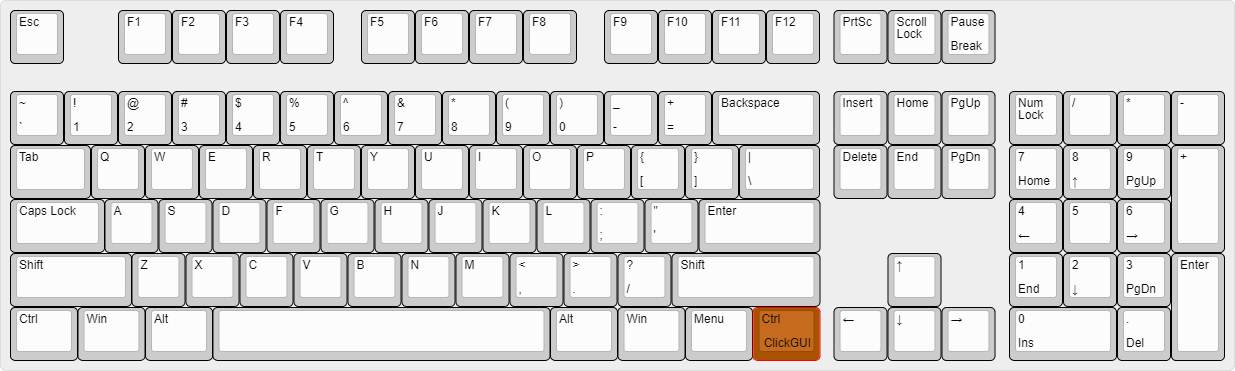
- Right CTRL → ClickGUI
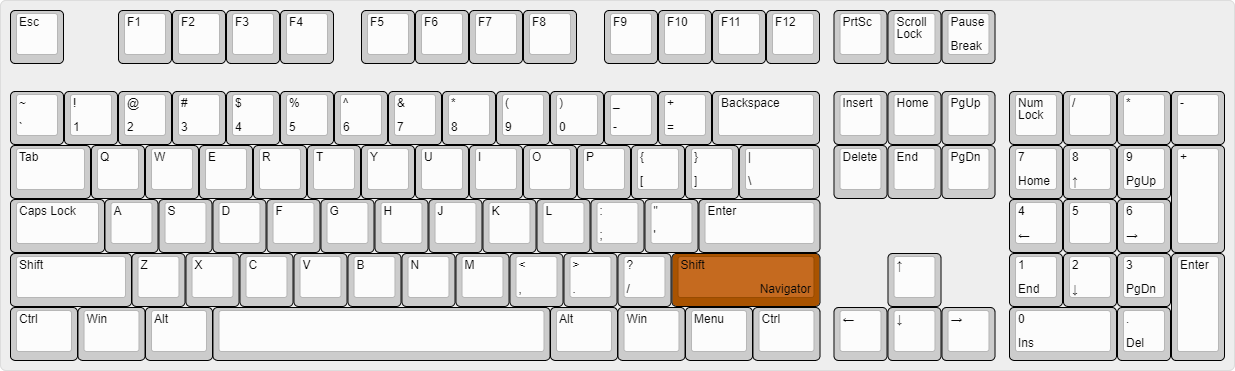
- Right SHIFT → Navigator
- U → Freecam
- X → X-Ray
- Y → Sneak
图形用户界面(GUIs)(3)
Wurst不仅有一个GUI。你可以选择你最喜欢的那一个。
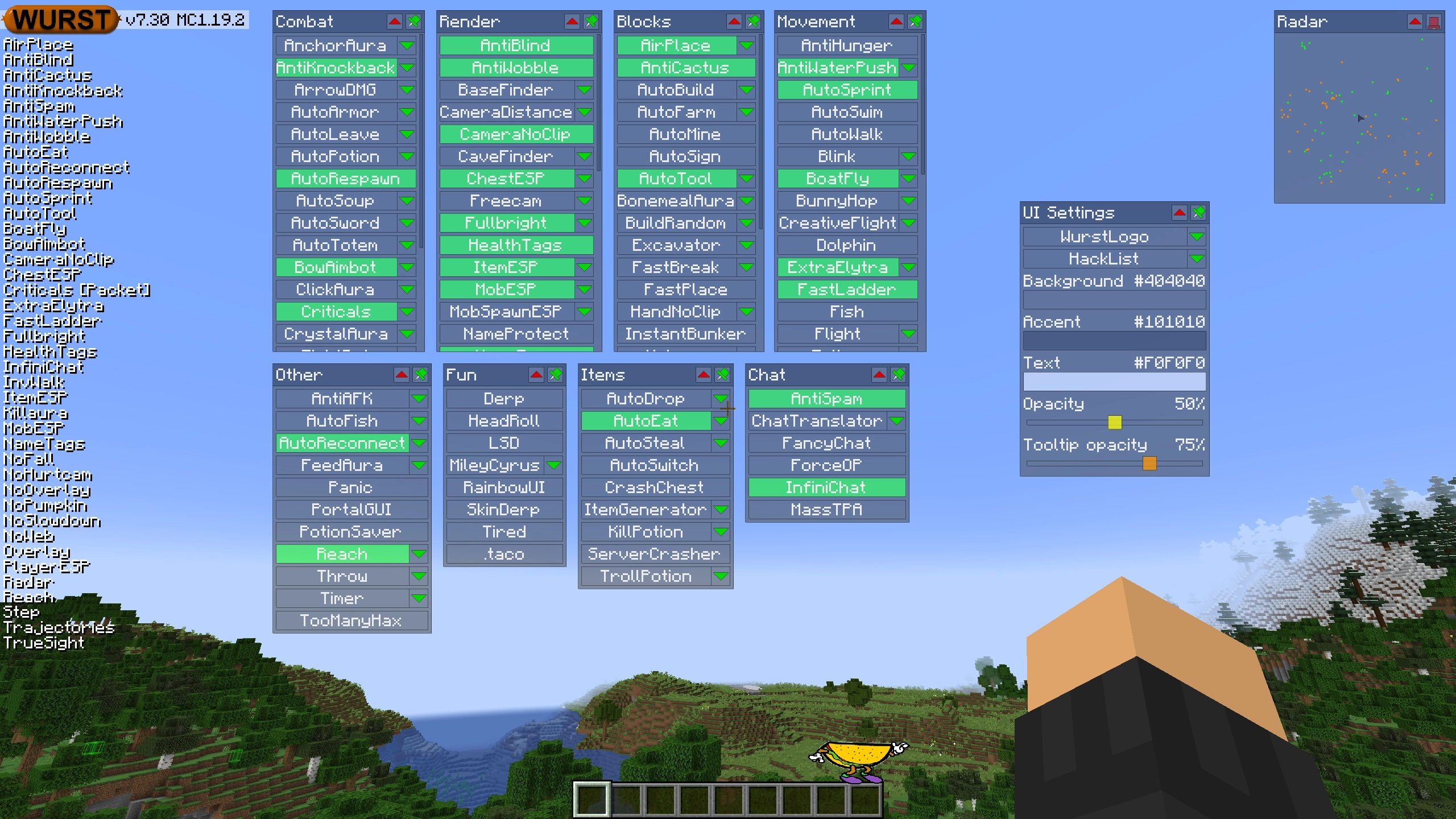
ClickGUI
ClickGUI可以通过 右CTRL 键打开。当打开时,它会显示每个类别的窗口,里面包含该类别中所有特性的列表。
导航器(Navigator)
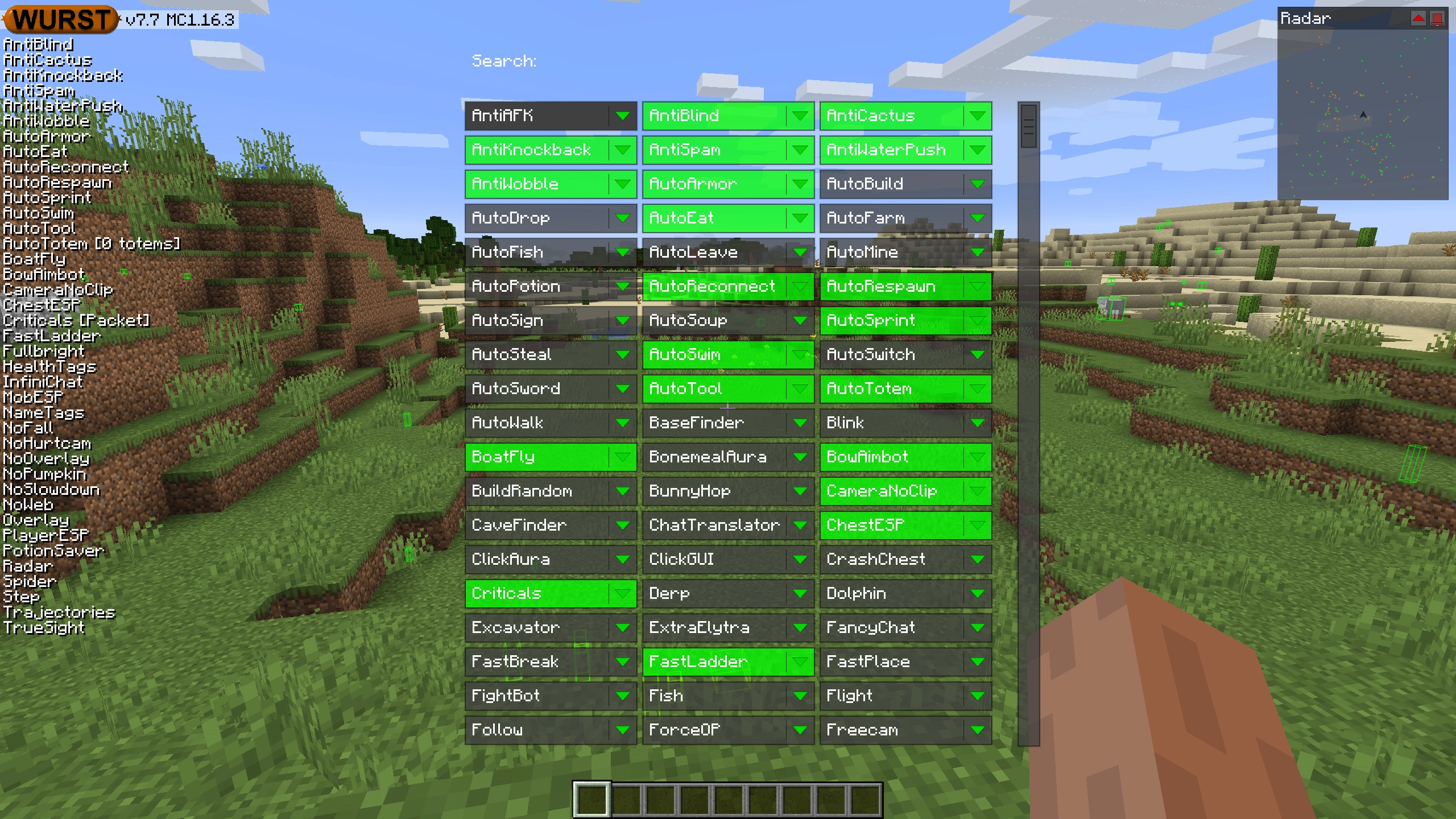
导航器可以通过 右Shift 键打开。当打开时,它会显示Wurst中所有特性的可搜索列表。
TabGUI
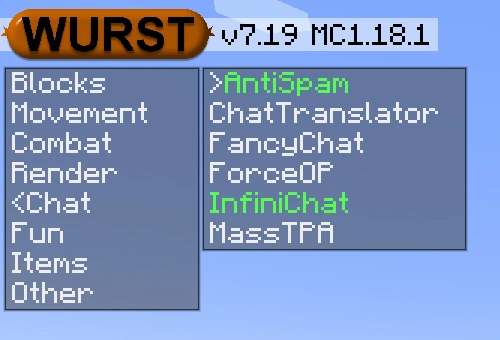
TabGUI没有默认的快捷键。你可以通过打开导航器GUI并搜索“TabGUI”来启用它(别担心,这个过程只需做一次)。
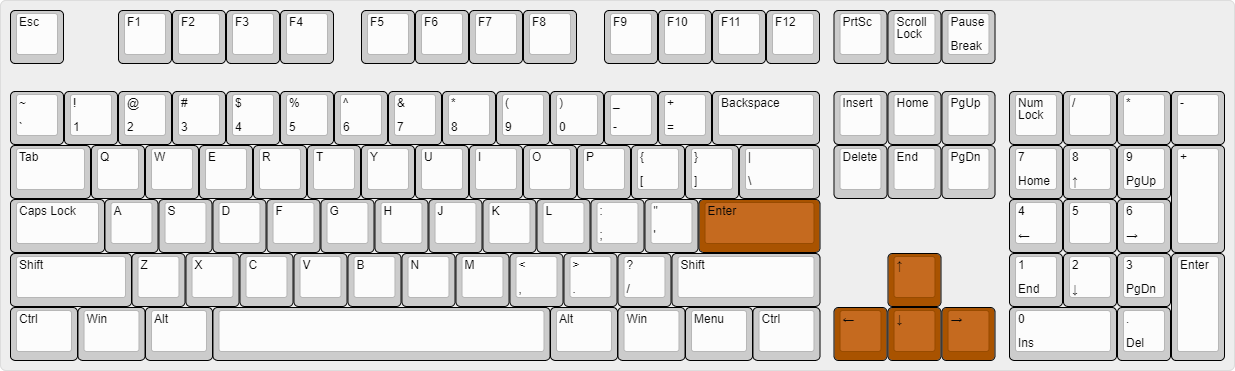
启用后,你可以使用 方向键 来更改选择,使用 Enter 来切换选定的特性。
支持的语言 (15)
翻译尚未完成,因此默认是禁用的。 请前往 Wurst 选项 → 翻译 以启用它们。
- Chinese (Simplified/Mainland)
- Chinese (Traditional/Taiwan)
- Chinese (Cantonese/Hong Kong)
- Czech
- English (US)
- French
- German
- Italian
- Japanese
- Korean
- Polish
- Romanian
- Russian
- Turkish
- Ukrainian
 Fabric API
v0.138.0+1.21.10
Fabric API
v0.138.0+1.21.10